
Wanderburg Performance and Crash Fixes
Troubleshoot Wanderburg crashes, Generating World freezes, Spiderburg selection and controller bugs with Steam launch choices and symptom-specific checks.
On this page+
If Wanderburg crashes or freezes at “Generating World,” update the game, verify its Steam files, then compare the default and DX12 launch choices. For an AMD GPU, compare Vulkan as a third choice rather than assuming it must work best. If the game stays open but controls or an upgrade screen stop responding, use the matching checks below.
| What happens? | Start here |
|---|---|
| Loading never leaves Generating World, or entering a Land closes the game | World-generation checks |
| Game will not start, or crashes during a run | File verification and graphics choices |
| Clicking Spiderburg closes the game | Spiderburg selection checks |
| Device-switch prompts flash, or steering becomes erratic | Controller and keyboard checks |
| Upgrade choices appear but cannot be selected | Upgrade-screen checks |
First: verify the Steam installation
- Let Steam finish any Wanderburg update and close the game.
- Restart your computer and open Steam.
- In Library, right-click Wanderburg → Properties → Installed Files → Verify integrity of game files.
- Wait for verification to finish, then repeat the action that failed once before changing anything else.
Valve notes that verification can take several minutes and that a local configuration file may fail verification without indicating a damaged installation. Avoid running another game's verification at the same time.
Stuck on Generating World or crashing when a Land starts
Compare the same Land with a different Steam graphics choice after verification. Write down whether the game exits, Steam exits, or the loading screen remains open; these lead to more useful reports than “loading broken.”
- Note the exact Land name and difficulty, selected vehicle, current graphics choice, and how long loading remained unchanged.
- Close the game completely. If Steam still marks it as running after a crash, use Windows Task Manager to end the remaining game process before relaunching.
- Try Play Wanderburg, then Play DX12 - use when game crashes, using the same Land and vehicle. Test Vulkan separately if offered.
- If that Land still fails, test a Land you could previously enter. A failure on one Land versus every Land is the key result to retain.
- If a mode works, repeat the original action before keeping it as the saved choice.
In a September 26 player report, reinstalling did not solve the stall and the author later identified Vulkan as the problem in that case. A fresh October 17 AMD report describes a crash when starting any world; an October 16 Linux report describes only World 3/Wiesen failing while Worlds 1 and 2 work. These are useful symptom comparisons, with no confirmed common fix in those threads as reviewed on October 19.
Hotfix 0.9.14 improved map-generation robustness. A remaining loading failure should therefore be reported with the installed build and the comparison above, rather than treated as proof that the old issue was fixed on every system.
Select DX12 or Vulkan through Steam
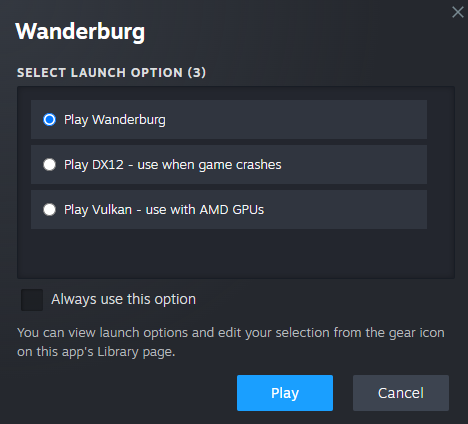
Launch Wanderburg from the Steam Library to access the choices shown in Randwerk's 0.9.8 screenshot:
| Steam selection | When to compare it |
|---|---|
| Play Wanderburg | Establish a baseline with the default selection. |
| Play DX12 - use when game crashes | The developer's alternative for crashes. |
| Play Vulkan - use with AMD GPUs | The developer's AMD suggestion; compare the actual result on your machine. |
These are menu selections, not text to paste into the command-line launch-options field. If Steam skips the dialog, use the gear icon on Wanderburg's Library page to view the launch choices and edit the saved selection. Keep Always use this option unchecked while comparing modes.
Change one mode at a time, restart the game, and repeat the same action. Record default: result / DX12: result / Vulkan: result. A mode that opens the menu but crashes on entering your Land has not passed the test.
Spiderburg crashes on preview or selection
If clicking Spiderburg closes the game, use the graphics comparison above and record whether the failure happens on preview, selection, or Start Run. The September 27–October 6 thread includes crashes both before and after unlock, including a Radeon user already using Vulkan.
If the game remains responsive and asks for another Top module, follow Spiderburg's equipment requirements. That is a loadout check: buying random equipment is not a demonstrated repair for the game closing.
If the selection screen freezes rather than closes, include the equipped modules in the report. Randwerk added safeguards for a Spider loadout freeze in 0.9.8; the later selection-crash reports need their own reproduction details.
Controller prompts keep switching or steering feels wrong
First distinguish input not being received from the selected driving style feeling unfamiliar. Try a menu selection and a short drive before a long run.
- Repeated device-switch icon: keep the keyboard and mouse idle while pressing a controller button. Then close the game, disconnect other input devices and relaunch with the controller you intend to use. This isolates competing input; it is a troubleshooting test, not a published Wanderburg fix.
- Steering works but feels wrong: compare the alternative controller driving style introduced in 0.9.8. Use the same vehicle for both tests; Tower and Spider handling also changed in 0.9.9.
- Keyboard turning continues after a boost or upgrade: release boost and movement keys, then press them again. Compare a short drive without boost to one with boost. An October 11–17 Linux player report specifically describes continued turning while Shift remains held; record your platform and result if your case matches.
The September 29–October 17 controller thread includes wired and wireless Xbox 360 users reporting repeated device-switch prompts. It contains no verified repair. A useful follow-up identifies the controller, connection type, selected driving style, whether menus accept input, and whether the switching icon appears with all other devices idle.
Nitro regeneration starts 0.5 seconds after boost use under the 0.9.8 change. Allow for that delay when comparing boost recovery with older footage.
Stuck on an upgrade or Rare Artifact screen
Release held movement and boost inputs, then try selecting the offer once. If it remains unresponsive, capture the offered upgrade, its tier, your vehicle, and whether you are in normal play or Overtime before restarting.
The Rare Artifact softlock was fixed in 0.9.10. A different thread began with an April demo bug, then received an October 16 player report about the last Ram upgrade in Overtime on Steam Deck. The developer's April reply applies to the demo; it does not establish the cause of the later report. For a matching current issue, attach the upgrade details instead of reporting only “same old freeze.”
Relevant performance fixes by version
| Build | Official change relevant to troubleshooting |
|---|---|
| 0.9.14 | More robust map generation, Escape-menu interaction and leaderboard loading; 240 FPS cap in the main menu and Overworld. |
| 0.9.13 | Improved idle performance; fixed close-biome driving, map-boundary and boss-spawn issues. |
| 0.9.10 | Fixed the Rare Artifact screen softlock. |
| 0.9.9 | Fixed the reverse/forward multiplier and adjusted Tower/Spider handling. |
| 0.9.8 | Added graphics launch choices, an alternative controller driving style and Spider loadout-freeze safeguards. |
For a slowdown after leaving the game open, compare one similar idle period after updating. For slowdowns during combat, note enemy density, active effects, Land and run duration. The menu/Overworld cap is not a published in-run FPS limit. The Updates timeline keeps the full patch history separate from these troubleshooting steps.
Send a report that includes the test result
Use the official community links and include: build; Windows/Linux/Steam Deck; GPU; controller if relevant; Land and difficulty; exact action; crash/freeze/input symptom; default/DX12/Vulkan results. Add whether verification or a full restart changed anything. A short clip of the failed action is more useful than a long hardware dump without reproduction steps.
For an old demo executable, check Demo and Playtest Status first: the Steam demo was retired at the Early Access launch.
Sources and review date
Reviewed October 19, 2026 against the official announcement feed, through gameplay build 0.9.14, and the original discussions below. The diagnostic sequence is our editorial synthesis; community cases are identified separately from developer fixes.
- Randwerk hotfixes 0.9.8–0.9.14 and the official three-choice launch dialog.
- Valve: verify installed files and close a silently crashed game.
- Player reports: September world-generation stall, October AMD world-generation crash, and Linux World 3 freeze.
- Player reports: Spiderburg selection crash, controller device switching, keyboard turning, and upgrade-screen thread with a later Steam Deck report.
Continue exploring
Related guides
Wanderburg Guides: Vehicles, Builds and Crash Help
Find Wanderburg guides for vehicle unlocks, Ram and mage builds, Silver purchases, All Lands won checks and crash troubleshooting, with practical next steps.
Wanderburg Beginner Guide: First Run Tips and Core Loop
Use this Wanderburg beginner guide to choose a starter weapon, collect Gold, prepare for bosses, use rerolls and spend Silver on your next useful unlock.
Wanderburg Best Build Guide: Three Practical Setups
This Wanderburg best build guide covers Ram, cannons and Spiderburg mages with starting gear, module slots, upgrade priorities and 0.9.14 patch changes.
Wanderburg Spiderburg Unlock Guide and Top Slot Fix
Use this Wanderburg Spiderburg unlock guide to clear Golden Dunes, budget Silver, check two Top modules and troubleshoot vehicle-selection crashes.